
Tillroom — Cafe POS and Inventory
A front-end cafe POS and inventory desk: modifiers, tips, gift cards, loyalty, kitchen display, multi-location stock, online ordering, roster and bookings.
Built with Grok Bot
What you get
- The full source code as a zip (HTML, CSS, JavaScript)
- An agent starter prompt and AGENT_HANDOFF.md for Cursor, Claude Code, Lovable or Bolt
- Setup steps to run it locally
- A list of what's done and what's left to build
On sale
Refund within 14 days if it doesn't work as described · see refund policy
Tillroom — Cafe POS and Inventory is a standalone app in Web apps. Built with Grok Bot and Plain HTML/JS, it works with Source code and A current Chrome, Safari, Firefox or Edge browser. Optional: any static host. No payment-provider or other accounts required to try it.. You can try the live demo on sample data before you buy, and it was last updated 16 Nov 2026 (version 1.4.0).
- What it is
- Code project with source in Web apps
- Best for
- Cafe and retail builders who want a front-end POS and inventory desk to host or wire to their own back end.
- Works with
- Source code, A current Chrome, Safari, Firefox or Edge browser. Optional: any static host. No payment-provider or other accounts required to try it.
- Built with
- Grok Bot, Plain HTML/JS
- Licence
- Standard
- The live demo is locked to its sample data
- Your own data runs only after you hold a licence
- Paid builds download with a short-lived signed link
- Your version stays yours, with fixes while it is on sale and new features for twelve months
Try the live demo
Runs on the bundled sample data.
What you need
| Tool or version | A current Chrome, Safari, Firefox or Edge browser. Optional: any static host. No payment-provider or other accounts required to try it. |
| Data fields | None |
| Browser | Any modern browser |
| Support | hello@dsdigitalapps.com |
See 15 alternatives to Tillroom — Cafe POS and Inventory
Version
1.4.0 · updated 16 Nov 2026
- Bookings day desk: validation, smallest-fit free tables, overlap checks, editable bookings, seating, no-shows, cancellation and completion. Seating updates the floor plan. - Covers by half hour, day navigation and walk-in waitlist with quoted waits. Table-ready notifications are labelled demos; nothing is sent. - Reorder planner: sales velocity, configurable cover and supplier lead days, open-PO quantities, supplier assignment, item selection, grouped draft purchase orders and CSV export. - CSV guard includes full-width formula prefixes; plain numeric cells remain numeric. - Separate `tillroom-v14` browser store, role guards, reset support and phone layouts. - 56 new automated checks; all 360 checks pass. Four new light screenshots.
Downloads are prepared per buyer and watermarked with your licence, so a copy that is shared can be traced. See the terms.
About this product
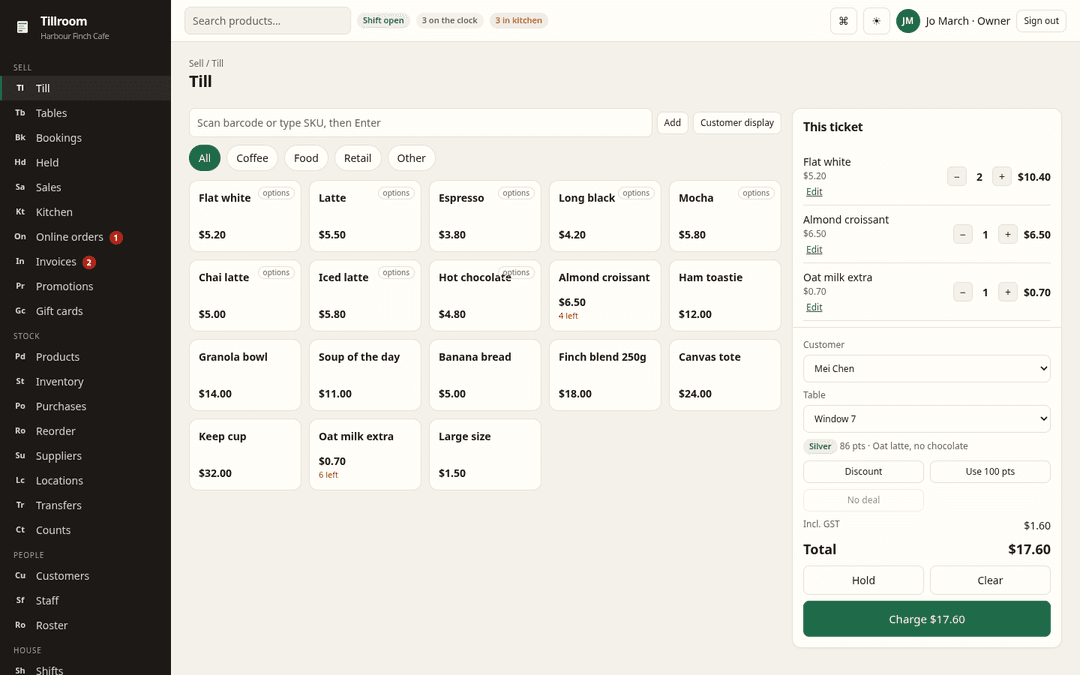
A front-end cafe POS and inventory desk: modifiers, discounts with manager PIN, tips, gift cards, loyalty, kitchen display, stock across three locations with transfers and counts, time clock, an end-of-day Z report, online ordering for pickup, menu engineering, a staff roster with labour cost, invoices and quotes on account, promotions product CSV import, bookings, a walk-in waitlist and reorder planning. No build step. Demo store: Harbour Finch Cafe.
Tillroom is a complete POS shell you can open in a browser. The demo is Harbour Finch Cafe on South Terrace, Fremantle, with coffee, food and a short retail shelf already stocked.
Sell. A category till, ticket cart, tables and takeaway, held checks, cash, card or split tender with change, and a printable GST-inclusive receipt. Refunds put tracked stock back. Cashiers cannot refund — sign in as a manager or the owner.
Stock. Products with SKUs and prices, an inventory list with low-stock flags, adjustments (count, receive, waste, use) and a movement log. Purchase orders can be drafted and marked received. Suppliers are included. Coffee made to order is untracked; pastry and retail decrement when you sell them.
New in 1.1. Drink modifiers and line notes, ticket discounts that ask for a manager PIN, tips, gift cards, part and even-split payments, loyalty points with rewards, a kitchen display that fills itself from food sales, a customer-facing display, SKU and barcode scan, stock across a cafe floor, back store and market stall with transfers and counts, a reorder list that drafts POs, a PIN time clock with timesheet export, and an end-of-day Z report that reconciles tenders and the cash drawer. A Ctrl+K palette and till shortcuts keep it fast; 117 automated checks ship with it.
New in 1.2. Customers order ahead on a public page and watch their order move from Sent to Ready. Staff run a live queue that sends food to the kitchen and rings the sale when it is collected, with Busy and Pause switches. A menu engineering report sorts the menu into stars, plowhorses, puzzles and dogs. A week roster shows wages, weekend loadings and labour % against forecast sales, and flags long days, missing breaks and overlaps.
New in 1.3. Invoice catering and office accounts, or quote them first and turn the quote into an invoice in one click. Part payments, overdue tracking and an aged receivables strip show who owes what. Set up happy hours, buy-3-get-1-free and combo deals once, and the till offers the best one on each ticket. Bring a whole catalogue in from a spreadsheet: every row is checked before anything changes, and the export round-trips. Every CSV the app writes is protected against spreadsheet formula injection.
New in 1.4. Run the day’s bookings with table-fit and overlap checks, seat parties into the floor plan, and manage walk-ins with quoted waits. See covers by half hour. Plan stock from sales rates, supplier lead times, cover targets and open orders, then create grouped draft POs for selected items. Table-ready alerts are demos and orders are never sent.
House. Open and close a shift with a cash float, customer records, staff roles, and reports for the day, for products and for staff. Light and dark themes. Settings for the store name, GST rate and receipt footer.
Open index.html or serve the folder. There is no npm install. Sales stay in this browser until you reset the demo. Tillroom does not take real payments, talk to a card terminal, or replace a hosted POS.
About this item
| Language | JavaScript, HTML, CSS |
| Platform | Web browser |
| Requirements | A current Chrome, Safari, Firefox or Edge browser. Optional: any static host. No payment terminal or card-processor account is included. |
| AI tool used | Grok Bot |
| Stack | HTML, CSS, JavaScript |
| Licence | Commercial use - unlimited projects |
| Delivery | Zip download |
| Setup notes | Unzip the package; Open index.html in a browser; Or serve the folder; There is no npm install; Demo store is Harbour Finch Cafe; Sales stay in this browser until reset |
| What's done | Till with modifiers; PIN discounts tips split tender; Gift cards and loyalty; Kitchen display; Customer display and barcodes; An end-of-day Z report; Three location stock; Transfers counts and POs; A reorder planner; Online order queue; Menu engineering; Roster with labour percent; Invoices and quotes; Promotions; Product CSV import export; Bookings and walk-in waitlist; Light and dark themes |
| Still to do | Does not take real payments; Does not talk to a card terminal; Table-ready alerts are demos; Online orders are never sent; Sales stay in this browser; Wire your own back end to persist |
| Version | 1.4.0 |
| What's included | index.html, css/, js/, Harbour Finch Cafe demo data, docs, changelog and 360 automated checks. Open index.html; no build step. |
| Last updated | 2026-11-13 |
| Licence | Standard |
About this seller
Big Ol' Studio
Australia
Member since 10 Oct 2026
- 20 listings
- 1 sale
The team behind The Big Ol' Market. We make the first-party products and keep the open feed format moving.
Item specifics
- Live data
- No
- Platform
- Web (any browser)HTML
- Source code included
- Yes
- Built with
- Grok Bot
- Tech stack
- Plain HTML/JS
- Industry
- Hospitality
- Licence
- Standard
- Updates included
- Yes
- Price
- US$50+
- Listing type
- Standalone app
| Type | Code project |
| What data it needs | Accounts, keys and env vars are listed in the setup steps. |
| How to connect it | Unzip the package Open index.html in a browser Or serve the folder There is no npm install Demo store is Harbour Finch Cafe Sales stay in this browser until reset |
| What you get | Source code and licence |
| Formats | Source code |
| Connectors | See how to connect it |
| Licence | Standard |
| Country | AU |
Questions about Tillroom — Cafe POS and Inventory
How does the Tillroom — Cafe POS and Inventory demo work?
The live demo runs in a sandbox in your browser on bundled sample data. Your own data only runs after you download or buy it.
How do I download Tillroom — Cafe POS and Inventory?
Buy it, then download it from your Library. Paid builds download with a short-lived signed link.
How do I use it with my AI agent?
Your Library shows a ready-made agent starter prompt for this project (stack, setup, what's done and what's left) with a copy button, plus an AGENT_HANDOFF.md file. Unzip the code, open it in Cursor, Claude Code, Lovable or Bolt, and paste the prompt. Your agent starts from working code instead of building it again.
Does it get updates?
Your version stays yours, with fixes while it is on sale and new features for twelve months. New versions appear in your Library.
Can I get a refund?
If it is faulty, does not work as described or does not match this listing, you can request a refund within 14 days of payment after giving the seller a chance to help. The seller decides. Change of mind is not covered. See the refund policy at /refunds.