
Business Starter Pack
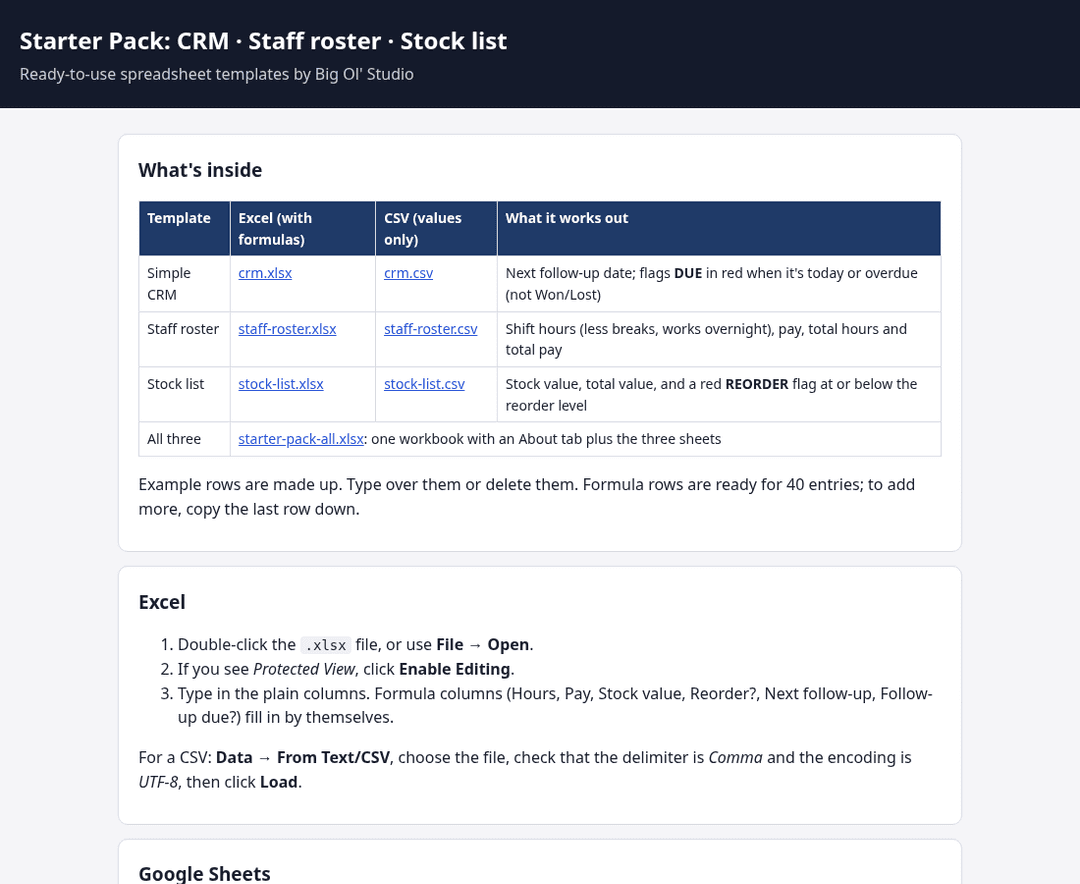
Three spreadsheet templates: a simple CRM, a staff roster and a stock list, with formulas. Excel and CSV. Not code.
Built with Grok Bot
What you get
- The project files as a zip
- An agent starter prompt and AGENT_HANDOFF.md for Cursor, Claude Code, Lovable or Bolt
- Setup steps to run it locally
Free to download
Business Starter Pack is a free download in Spreadsheet templates (Excel, Sheets). Built with Grok Bot, it works with XLSX, CSV and Excel, Google Sheets or Apple Numbers. It was last updated 13 Oct 2026 (version 1.0.0).
- What it is
- Free download in Spreadsheet templates (Excel, Sheets)
- Best for
- Small businesses that want ready spreadsheets, or builders who want sample data structures for a CRM, roster or stock app
- Works with
- XLSX, CSV, Excel, Google Sheets or Apple Numbers
- Built with
- Grok Bot
- Licence
- Free
- Free to download. Sign in, then download the zip from your Library
- Your version stays yours, with fixes while it is on sale and new features for twelve months
What you need
| Tool or version | Excel, Google Sheets or Apple Numbers |
| Data fields | Your own rows; templates included |
| Browser | Any modern browser |
Version
1.0.0 · updated 13 Oct 2026
First release.
About this product
Three spreadsheet templates: a simple CRM, a staff roster and a stock list, with formulas. Excel and CSV. Not code.
Files: xlsx/crm.xlsx, staff-roster.xlsx, stock-list.xlsx, starter-pack-all.xlsx · csv/ (same, values only) · guide.html (formula hints) · NOTION-IMPORT.md
What's done
- Live formulas (follow-up due, hours and pay, stock value and reorder flags)
- styled headers, filters, frozen rows
- CRM stage dropdown
- CSV copies
- Notion import notes
Setup
- Open the .xlsx files in Excel or Google Sheets, or import the CSVs.
Set it up
- Sign in and download the zip from your Library.
- Unzip it. Open the files in the xlsx folder with Excel, or upload them to Google Sheets (File, Import).
- Prefer plain data? The csv folder has the same sheets. NOTION-IMPORT.md shows how to bring them into Notion.
- Open guide.html in any browser for a short tour of each sheet.
About this item
| AI tool used | Grok Bot |
| Setup notes | Open the .xlsx files in Excel or Google Sheets, or import the CSVs. |
| What's done | Live formulas (follow-up due, hours and pay, stock value and reorder flags); styled headers, filters, frozen rows; CRM stage dropdown; CSV copies; Notion import notes |
| Version | 1.0.0 |
| What's included | xlsx/crm.xlsx, staff-roster.xlsx, stock-list.xlsx, starter-pack-all.xlsx · csv/ (same, values only) · guide.html (formula hints) · NOTION-IMPORT.md |
| Last updated | 13 Oct 2026 |
| Licence | Free |
About this seller
Big Ol' Studio
Australia
Member since 10 Oct 2026
- 20 listings
- 1 sale
The team behind The Big Ol' Market. We make the first-party products and keep the open feed format moving.
Item specifics
- Live data
- No
- Works with
- ExcelGoogle Sheets
- Best on
- DesktopPhone
- Built with
- Grok Bot
- Licence
- Free
- Updates included
- Yes
- Price
- Free
- Listing type
- Live plug-in
| Type | Free download |
| Formats | XLSX, CSV |
| Connectors | None needed |
| Licence | Free |
| Country | AU |
Questions about Business Starter Pack
How does the Business Starter Pack demo work?
This listing has no live demo yet. Check the screenshots and video above.
How do I download Business Starter Pack?
Sign in, click Get it free, then download the zip from your Library.
How do I use it with my AI agent?
Your Library shows a ready-made agent starter prompt for this project (stack, setup, what's done and what's left) with a copy button, plus an AGENT_HANDOFF.md file. Unzip the code, open it in Cursor, Claude Code, Lovable or Bolt, and paste the prompt. Your agent starts from working code instead of building it again.
Does it get updates?
Your version stays yours, with fixes while it is on sale and new features for twelve months. New versions appear in your Library.
Can I get a refund?
It's free, so there's nothing to refund. If it doesn't work, message the seller or contact us.