
Paginate Kit for Tiptap, Studio licence
Studio licence (whole team, unlimited projects) for the Tiptap 3 pagination extension: A4/Letter pages, headers, footers, page numbers, tables, print-exact PDF.
Saves ~US$800–1,500 in AI credits / 120–200 hours of rebuilding it yourself · Built with Claude Code, Hand-coded
What you get
- The full source code as a zip (TypeScript, Tiptap 3, ProseMirror, React 18/19, Vite, Vitest)
- An agent starter prompt and AGENT_HANDOFF.md for Cursor, Claude Code, Lovable or Bolt
- Setup steps to run it locally
- A list of what's done and what's left to build
On sale
Refund within 14 days if it doesn't work as described · see refund policy
Paginate Kit for Tiptap, Studio licence is a standalone app in UI components. Built with Claude Code, Hand-coded and React, it works with Source code and Node 20+, npm. No accounts, keys or services.. You can try the live demo on sample data before you buy, and it was last updated 4 Nov 2026 (version 0.1.0).
- What it is
- Code project with source in UI components
- Best for
- Builders who want working code to hand to their AI agent
- Works with
- Source code, Node 20+, npm. No accounts, keys or services.
- Built with
- Claude Code, Hand-coded, React, Node.js
- Licence
- Standard
- The live demo is locked to its sample data
- Your own data runs only after you hold a licence
- Paid builds download with a short-lived signed link
- Your version stays yours, with fixes while it is on sale and new features for twelve months
Try the live demo
Runs on the bundled sample data.
What you need
| Tool or version | Node 20+, npm. No accounts, keys or services. |
| Data fields | None |
| Browser | Any modern browser |
| Support | hello@dsdigitalapps.com |
See 2 alternatives to Paginate Kit for Tiptap, Studio licence
Version
0.1.0 · updated 4 Nov 2026
First release. Pagination extension, sections, running headers and footers, page numbers, breaks, widow/orphan control, splitting tables, anchored images and text boxes, zoom, DOM-free print and PDF export, React sheet layer, 378 tests.
Downloads are prepared per buyer and watermarked with your licence, so a copy that is shared can be traced. See the terms.
About this product
Studio licence. This listing is the Studio tier of Paginate Kit for Tiptap: one organisation named at purchase, any number of its developers, any number of its own and client projects. Same source zip, same demo, same updates as the Personal listing (US$69, one named developer): https://thebigolmarket.com/listing/paginate-kit-for-tiptap. Full terms are in LICENSE.md inside the download.
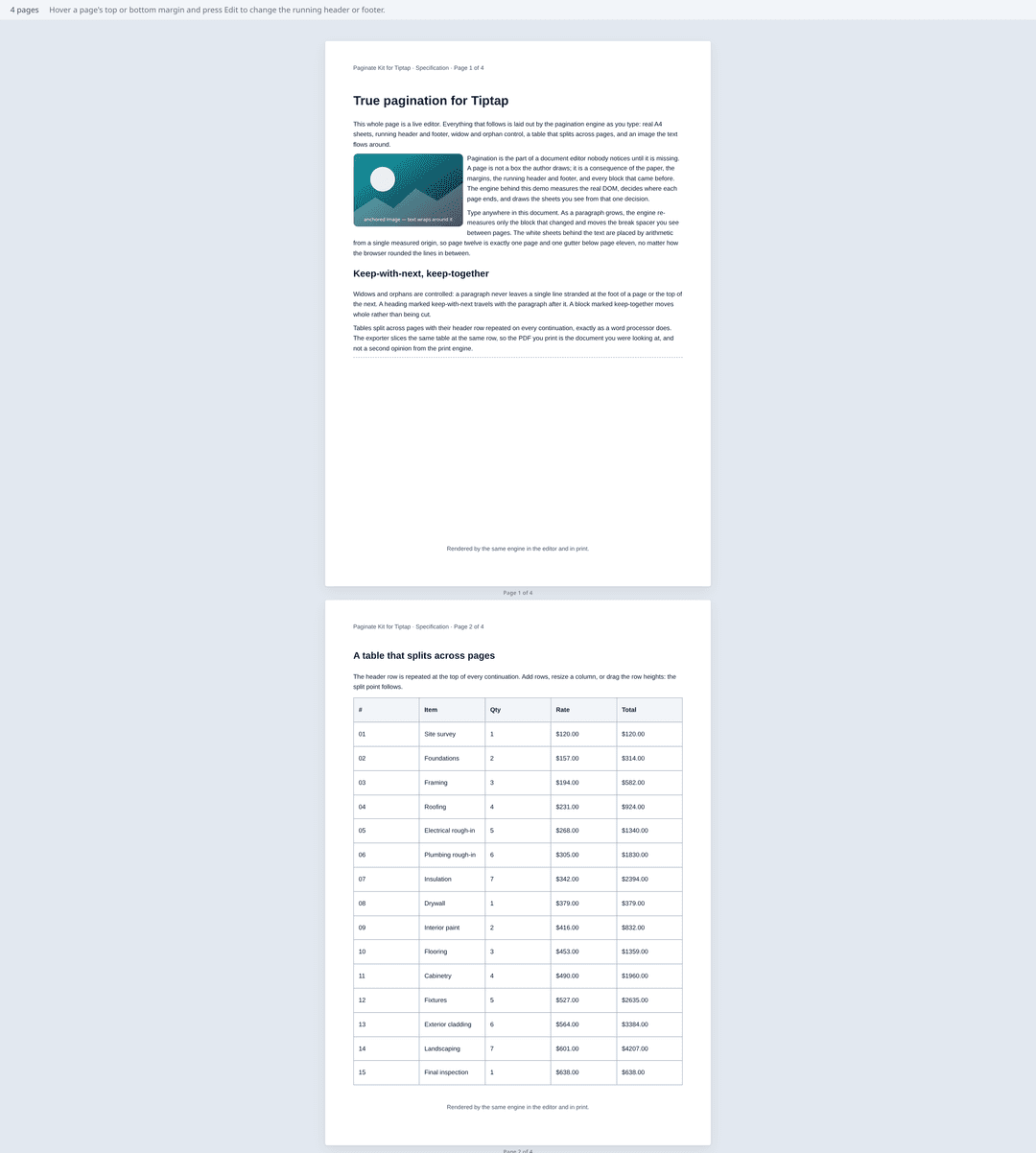
Source for a Tiptap 3 / ProseMirror extension that paginates inside the editor. The document is laid out on real A4, Letter, A5, Legal or custom pages with margins, and the running header, footer, page numbers and the printed PDF all come from the same layout the editor drew. Extracted from a production document editor, not written for the listing.
What it does
- Pages and sections. Each section has its own paper size, orientation, four margins, header and footer distance, and page numbering (decimal, roman, alpha, none; restart or continue; different first page). Manual page breaks and section breaks.
- Running headers and footers edited in place. Hover the band, press Edit, type. Page-number tokens (page, page count) resolve per page in the editor and in the export. Scope a band to all pages, first page only, from this page on, or this page only. Fill colour, full-bleed and band depth.
- Widow and orphan control,
keepWithNextandkeepTogetheron any block. - Tables split across pages with the header row repeated on each continuation. Column and row resizing.
- Anchored images and text boxes the text wraps around (square, tight, top/bottom, behind, in front). Drag to move, eight handles to resize, snapping to the margins, the centre line and the anchor paragraph with guide lines. Painted at the engine's page coordinates on every page.
- Zoom, and a fit-to-width read-only preview component.
- A DOM-free exporter:
toPagedHTML()turns the layout plus document JSON into fixed-size page boxes,pagedPageCSS()writes the@pagerules,printPagedDocument()opens the result and callsprint(). "Save as PDF" in the browser is the export. No server, no conversion API. - The layout is plain JSON. Store it beside the document and
renderPdf()(or thepaginate-pdfCLI) prints it to PDF in Node with a headless Chromium — the same pages, no browser tab.
How it is built
Three layers, and the split is the design: schema/ (what a node is, no DOM, no React), extensions.ts (node views and gesture plugins for editing), pagination/ (the Pagination extension, the pure paginate() algorithm, the one DOM-touching measureDoc(), and the exporter). paginate() and toPagedHTML() are unit-tested without a browser. React hosts import tiptap-paginate-kit/react for the sheet layer; the core entry needs no React.
About 18,000 lines of TypeScript including tests, 378 vitest tests. Peer dependencies are the public @tiptap/* packages only. No private registry, no runtime licence check, no telemetry, no subscription.
Who it suits
Builders adding a Word-like page view to a Tiptap editor: contracts, proposals, reports, quotes, letters, anything a customer will print or send as PDF. Also anyone who tried Tiptap Pages and wants the source, tables included, for a one-off price instead of US$49 a month plus the Team plan for page layouts (see the comparison note on the listing).
What a buyer would build on top
Your own toolbar (the demo's is deliberately plain), a page-setup dialog over setSectionAttrs(), a DOCX path from the JSON layout, collaboration (the engine is yjs-compatible; pass undoRedo: false and add Tiptap's Collaboration extensions).
Known limits in 0.1.0
Floating a table positions it in the export but the editor draws it in the flow. Editor and print surface both render at 13px Helvetica/Arial by default; change both or neither, because the base measure decides where lines wrap. Interactive editing is verified headlessly in Chromium and Firefox (npm run e2e); Safari is unverified. The Node PDF path needs the layout the editor stored (no fresh layout in Node yet) and Chromium via playwright-core.
About this item
| Language | TypeScript, JavaScript, CSS |
| AI tool used | Claude Code, Hand-coded |
| Stack | TypeScript, Tiptap 3, ProseMirror, React 18/19, Vite, Vitest |
| Estimated credits saved | ~US$800–1,500 in AI credits |
| Estimated hours saved | 120–200 hours |
| Setup notes | Node 20+. Unzip, then npm install at the root (workspaces: packages/core and apps/demo); npm run dev opens the demo at http://localhost:5190; npm test runs the 378 unit tests; npm run build builds the package to packages/core/dist; In your app: npm i tiptap-paginate-kit plus the @tiptap/* peers listed in README.md; Add ...paginateExtensions() and Pagination.configure({ onLayout }) to useEditor, give the editor root the class doc-content, and mount PaginatedCanvas in a flex column with a height; Import tiptap-paginate-kit/styles.css |
| What's done | Sections: A4/A3/A5/Letter/Legal/custom paper, orientation, margins, numbering; Headers and footers edited in place, page-number tokens, per-page scope; Widow/orphan, keep-with-next, keep-together, page and section breaks; Tables split across pages, header rows repeated; Anchored images and text boxes: wrap, drag, 8 handles, snapping; Zoom and preview; Print export; Node PDF via headless Chromium |
| Still to do | Headless PDF needs the editor's stored layout (no fresh layout in Node yet); Floating tables are positioned in the export but drawn in the flow in the editor; Collaboration wiring (yjs-compatible, not wired); Page-setup dialog and a full toolbar (the demo toolbar is minimal); DOCX export |
| Version | 0.1.0 |
| Last updated | 4 Nov 2026 |
| Licence | Standard |
About this seller
Item specifics
- Platform
- Web (any browser)
- Built with
- Claude CodeHand-coded
- Tech stack
- ReactNode.js
- Licence
- Standard
- Updates included
- Yes
- Price
- US$50+
- Listing type
- Standalone app
| Type | Code project |
| What data it needs | Accounts, keys and env vars are listed in the setup steps. |
| How to connect it | Node 20+. Unzip, then npm install at the root (workspaces: packages/core and apps/demo) npm run dev opens the demo at http://localhost:5190 npm test runs the 378 unit tests; npm run build builds the package to packages/core/dist In your app: npm i tiptap-paginate-kit plus the @tiptap/* peers listed in README.md Add ...paginateExtensions() and Pagination.configure({ onLayout }) to useEditor, give the editor root the class doc-content, and mount PaginatedCanvas in a flex column with a height Import tiptap-paginate-kit/styles.css |
| What you get | Source code and licence |
| Formats | Source code |
| Connectors | See how to connect it |
| Licence | Standard |
| Country | AU |
Questions about Paginate Kit for Tiptap, Studio licence
How does the Paginate Kit for Tiptap, Studio licence demo work?
The live demo runs in a sandbox in your browser on bundled sample data. Your own data only runs after you download or buy it.
How do I download Paginate Kit for Tiptap, Studio licence?
Buy it, then download it from your Library. Paid builds download with a short-lived signed link.
How do I use it with my AI agent?
Your Library shows a ready-made agent starter prompt for this project (stack, setup, what's done and what's left) with a copy button, plus an AGENT_HANDOFF.md file. Unzip the code, open it in Cursor, Claude Code, Lovable or Bolt, and paste the prompt. Your agent starts from working code instead of building it again.
Does it get updates?
Your version stays yours, with fixes while it is on sale and new features for twelve months. New versions appear in your Library.
Can I get a refund?
If it is faulty, does not work as described or does not match this listing, you can request a refund within 14 days of payment after giving the seller a chance to help. The seller decides. Change of mind is not covered. See the refund policy at /refunds.