
Inlet — omnichannel inbox (WhatsApp, SMS, email, web chat)
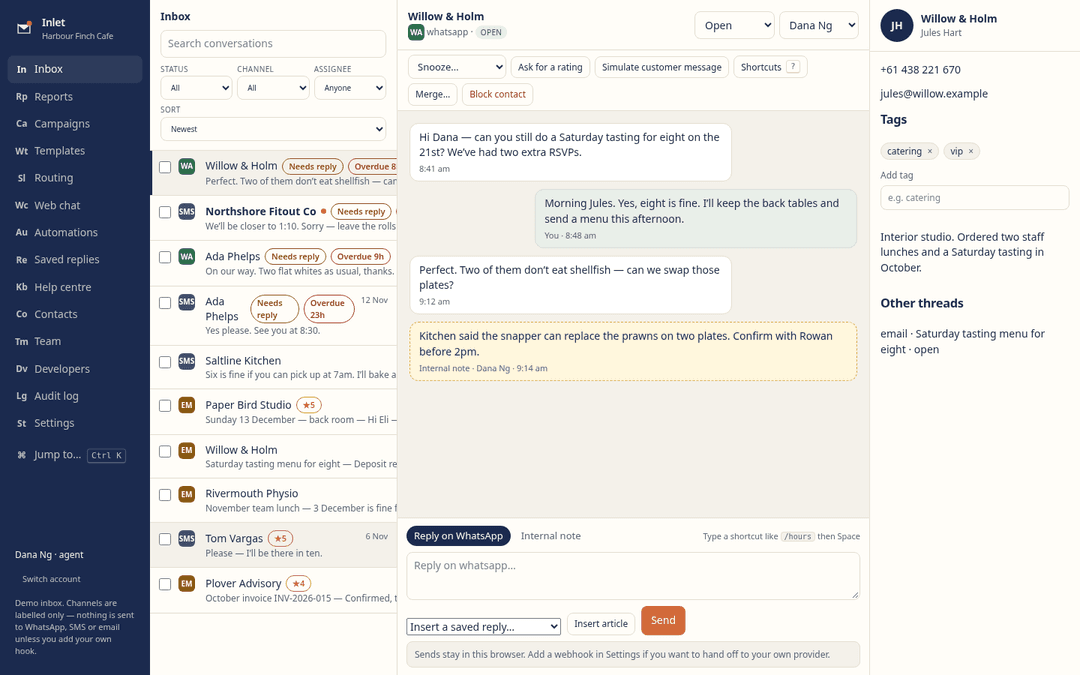
A full inbox desk for WhatsApp, SMS, email and a website chat widget, with SLA timers, assignment, automations, campaigns, a help centre and team roles.
Built with Grok Bot
What you get
- The full source code as a zip (HTML, CSS, JavaScript)
- An agent starter prompt and AGENT_HANDOFF.md for Cursor, Claude Code, Lovable or Bolt
- Setup steps to run it locally
- A list of what's done and what's left to build
On sale
Refund within 14 days if it doesn't work as described · see refund policy
Inlet — omnichannel inbox (WhatsApp, SMS, email, web chat) is a standalone app in Web apps. Built with Grok Bot and Plain HTML/JS, it works with Source code and A current Chrome, Safari, Firefox or Edge browser. Optional: any static host. A provider of your own only if you want messages to leave the browser.. You can try the live demo on sample data before you buy, and it was last updated 16 Nov 2026 (version 1.4.0).
- What it is
- Code project with source in Web apps
- Best for
- Small businesses and builders who want a front-end omnichannel inbox desk to host or connect to their own provider.
- Works with
- Source code, A current Chrome, Safari, Firefox or Edge browser. Optional: any static host. A provider of your own only if you want messages to leave the browser.
- Built with
- Grok Bot, Plain HTML/JS
- Licence
- Standard
- The live demo is locked to its sample data
- Your own data runs only after you hold a licence
- Paid builds download with a short-lived signed link
- Your version stays yours, with fixes while it is on sale and new features for twelve months
Try the live demo
Runs on the bundled sample data.
What you need
| Tool or version | A current Chrome, Safari, Firefox or Edge browser. Optional: any static host. A provider of your own only if you want messages to leave the browser. |
| Data fields | None |
| Browser | Any modern browser |
| Support | hello@dsdigitalapps.com |
See 15 alternatives to Inlet — omnichannel inbox (WhatsApp, SMS, email, web chat)
Version
1.4.0 · updated 16 Nov 2026
- **Help centre** (`#/kb`): published, draft, view and "helpful" totals; search, category and status filters; an article editor with title, auto-generated link, category, simple formatting (headings, bullets, steps, bold, safe links), a live preview and validation. Agents save drafts and the owner publishes or deletes. Eight sample articles for Harbour Finch Cafe. - **Public help site** (`#/help`): search, categories, article pages with related articles, "Was this helpful?" (one vote per browser), view counts and a "Chat with us" link. Drafts are never shown. - **Inbox:** "Insert article" in the composer adds a titled help-centre link at the cursor. **Merge** a conversation into another (same customer listed first): messages move across, a note records it, and the old one closes with a banner. **Block contact** closes their conversations, drops new messages from that number or email and leaves them out of campaign counts; unblock any time. - **Audit log** (`#/audit`, owner only): every reply, note, assignment, status change, merge, block, contact edit, article and settings change, with who and when. Search, teammate and type filters, paging, CSV export guarded against spreadsheet formulas, and Clear (which leaves a marker). Keeps the latest 1,000 entries. - Tests: `tests/v14_checks.py` (108 checks). Total 301.
Downloads are prepared per buyer and watermarked with your licence, so a copy that is shared can be traced. See the terms.
About this product
A full inbox desk for WhatsApp, SMS, email and a website chat widget: threads, SLA timers, round-robin assignment, bulk actions, a knowledge base with a public help centre, an audit log, merge and block, internal notes, keyword automations, a WhatsApp template builder, consent-aware campaigns with results, contact profiles, CSV import, reports, team roles and light/dark themes. Demo data included. Bring your own provider hook — this is not a WhatsApp-certified product.
Small businesses want one desk for the messages that already arrive on three channels. Inlet is a complete inbox you can open from a file: conversation list, thread, contact card, saved replies, campaigns, a reports board, and settings with owner and agent roles. The Harbour Finch Cafe sample has ten fictional threads so a buyer can click around immediately. Version 1.2 adds the parts WACRM-style buyers ask for: keyword automations with business hours and an away message, a WhatsApp template builder with a live phone preview, internal notes and snooze, CSAT, marketing consent per channel, CSV import, campaign scheduling with a results funnel, and a developer page with a delivery log and an Inlet.receive() hook for inbound messages. Version 1.3 adds a website chat widget with a builder and a working demo site, first-reply SLAs with overdue chips, round-robin auto-assign with availability and caps, and bulk actions in the inbox. Light and dark themes are built in. Outbound mail stays in the browser unless they point a webhook at their own provider. The listing should say clearly that Inlet is not a WhatsApp Business Solution Provider and does not include certification. Version 1.4 adds a knowledge base with a public help centre (search, categories, related articles, "was this helpful" votes and view counts), a one-click "Insert article" link in the composer, merging duplicate conversations, blocking spam contacts, and an owner-only audit log of every agent action with filters and CSV export.
About this item
| Language | JavaScript, HTML, CSS |
| Platform | Web browser |
| Requirements | A current Chrome, Safari, Firefox or Edge browser. Optional: any static host. Your own messaging provider if you want messages to leave the browser. |
| AI tool used | Grok Bot |
| Stack | HTML, CSS, JavaScript |
| Licence | Commercial use - unlimited projects |
| Delivery | Zip download |
| Setup notes | Unzip the package; Open index.html in a browser; Demo accounts are in docs/setup.md; No live provider is required to try it; Edit data/sample.js to rebrand; Point the webhook at your own provider |
| What's done | Omnichannel inbox for WhatsApp and SMS; Email and a website chat widget; SLA timers; Round-robin assignment; Bulk actions and internal notes; Automations; Knowledge base and a public help centre; Merge and block; An owner audit log; WhatsApp template builder; Consent-aware campaigns; Contacts and CSV import; Reports and team roles; Light and dark themes; Inlet.receive hook; Demo data and docs |
| Still to do | A real messaging-provider integration; Attachments; Read receipts from a live API; Shared team logins; An inventory of opted-in numbers; Not a WhatsApp-certified product; Outbound mail stays in the browser; Add your own provider hook to send |
| Version | 1.4.0 |
| What's included | index.html, css/, js/, Harbour Finch sample data, docs, tests, CHANGELOG, README and favicon. Open index.html; no build step. |
| Last updated | 2026-11-13 |
| Licence | Standard |
About this seller
Big Ol' Studio
Australia
Member since 10 Oct 2026
- 20 listings
- 1 sale
The team behind The Big Ol' Market. We make the first-party products and keep the open feed format moving.
Item specifics
- Live data
- No
- Platform
- Web (any browser)HTML
- Source code included
- Yes
- Built with
- Grok Bot
- Tech stack
- Plain HTML/JS
- Licence
- Standard
- Updates included
- Yes
- Price
- US$50+
- Listing type
- Standalone app
| Type | Code project |
| What data it needs | Accounts, keys and env vars are listed in the setup steps. |
| How to connect it | Unzip the package Open index.html in a browser Demo accounts are in docs/setup.md No live provider is required to try it Edit data/sample.js to rebrand Point the webhook at your own provider |
| What you get | Source code and licence |
| Formats | Source code |
| Connectors | See how to connect it |
| Licence | Standard |
| Country | AU |
Questions about Inlet — omnichannel inbox (WhatsApp, SMS, email, web chat)
How does the Inlet — omnichannel inbox (WhatsApp, SMS, email, web chat) demo work?
The live demo runs in a sandbox in your browser on bundled sample data. Your own data only runs after you download or buy it.
How do I download Inlet — omnichannel inbox (WhatsApp, SMS, email, web chat)?
Buy it, then download it from your Library. Paid builds download with a short-lived signed link.
How do I use it with my AI agent?
Your Library shows a ready-made agent starter prompt for this project (stack, setup, what's done and what's left) with a copy button, plus an AGENT_HANDOFF.md file. Unzip the code, open it in Cursor, Claude Code, Lovable or Bolt, and paste the prompt. Your agent starts from working code instead of building it again.
Does it get updates?
Your version stays yours, with fixes while it is on sale and new features for twelve months. New versions appear in your Library.
Can I get a refund?
If it is faulty, does not work as described or does not match this listing, you can request a refund within 14 days of payment after giving the seller a chance to help. The seller decides. Change of mind is not covered. See the refund policy at /refunds.